AI Old Photo Restorer
How to install AI Old Photo Restorer 2.0.0?
1. Download the ZIP file.
2. Install the Split APKs Installer application
3. Open the application and click on "Install APKs".
4. Find the folder where the downloaded ZIP is located and select it.
5. Follow the steps that appear on the screen.
Description
AI Old Photo Restorer
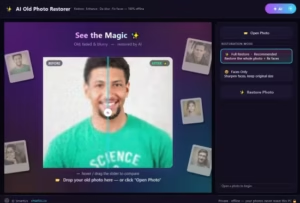
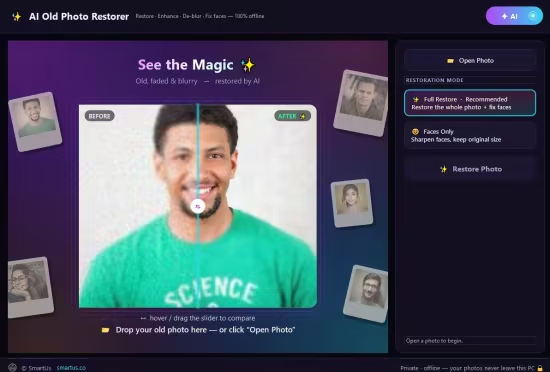
Bring your old photos back to life with AI — right on your own PC. AI Old Photo Restorer repairs, enhances and sharpens old, faded, scratched and blurry pictures in seconds, and restores the faces of the people you love — without ever uploading your memories. Everything runs 100% offline. Your precious family photos never leave your computer. No internet, no subscription, no monthly fees.
WHAT IT DOES
- Restore faces faithfully — sharpen the people in your photo without changing who they are
- De-blur & un-blur — turn soft, out-of-focus pictures crisp and clear
- Remove noise & grain from old scans and phone photos
- Upscale & enhance — recover detail and boost quality
- Fix old, faded, low-resolution and damaged photos
- Restore several faces at once — perfect for family & group photos
TWO ONE-CLICK MODES
- Full Restore — restore the whole photo + fix every face (recommended)
- Faces Only — sharpen faces, keep the original size
BEAUTIFUL & EASY
- Drag the before/after slider to see every detail come back
- Save a restored copy right next to your original — one click
- Just open a photo and press Restore. That’s it.
PRIVATE & 100% OFFLINE
Your photos are processed entirely on your PC and are never uploaded to any server — ideal for personal, family and sensitive photos.
PERFECT FOR
Old family photos • Grandparents’ pictures • Childhood photos • Faded & scratched prints • Blurry phone shots • Scanned albums • Restoring & preserving memories
Release Notes
- NEW: 10 languages — English, Français, Deutsch, Español, Português (Brasil), Italiano, Polski, Türkçe, Bahasa Indonesia and 日本語.
- Stronger automatic restore: scratches, spots, faded colours and colour casts are fixed better, noise removal adapts to each photo and faces are found more reliably
- NEW: Open Photo and Open Folder at the top — Open Folder restores a whole folder with Bulk Restore
- NEW: Clear, Undo and Reset under the photo, plus a right-click menu on the photo
- Restoring again? Choose to start from the restored photo or the original
- NEW: Cancel a restore at any time
- A memory check before very large restores; your PC stays responsive while the AI works
System Requirements
Windows 10 version 17763.0 or higher
What's new
- : 10 languages — English, Français, Deutsch, Español, Português (Brasil), Italiano, Polski, Türkçe, Bahasa Indonesia and 日本語.
- Stronger automatic restore: scratches, spots, faded colours and colour casts are fixed better, noise removal adapts to each photo and faces are found more reliably
- NEW: Open Photo and Open Folder at the top — Open Folder restores a whole folder with Bulk Restore
- NEW: Clear, Undo and Reset under the photo, plus a right-click menu on the photo
- Restoring again? Choose to start from the restored photo or the original
- NEW: Cancel a restore at any time
- A memory check before very large restores; your PC stays responsive while the AI works
Images