Exportizer Enterprise Multilingual
24.8 MB
10.3.6.875
Windows 7/8/10/11, .NET 4.52
7010
Description
Exportizer Enterprise
Exportizer is a database export tool. It allows to browse, edit, and export data to database, file, clipboard, or printer. This is an extremely cheap, but very powerful database export solution which opens tens of database types and supports tens of destination formats.
Export Multiple Tables
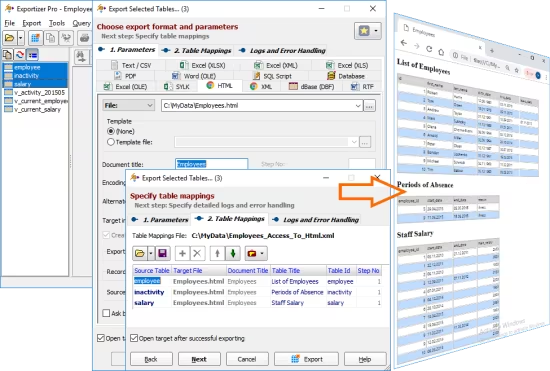
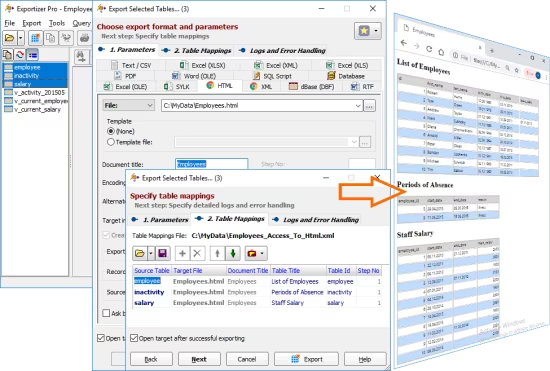
With Exportizer Pro, it is possible to export multiple database tables during a single export operation.
By default, the tables are exported to destination as one-to-one.
Export Multiple Tables to One Target
For some destination formats (e.g. HTML, XLSX, or any relational database), it is possible to export several tables to one target table or file.
Export Database Images and Blobs
This tool can automatically detect the most known image types (JPEG, PNG, GIF, BMP, ICO) in BLOB fields and export them, for example, to HTML or PDF. During the export, you can convert BLOB images to another image format.
Export BLOB Data
Generally, any BLOB/CLOB data can be exported into individual files, binary or text, within a single export step. For images, there is a possibility to change format (e.g. convert bitmaps from BLOBs into .png files) on the fly.
Export Calculated Fields
There is an ability to specify the source-to-target field mappings for export session. In the source part of them, you can use either physical fields from the source database or your own calculated fields (i.e. dynamically calculated expressions).
Supported source data types
– ODBC data sources;
– files of DB (Paradox), DBF (dBase, FoxPro), MDB, ACCDB, XLS, XLSX, GDB, IB, FDB, HTML, UDL, DBC, TXT, CSV types;
– databases specified by ADO connection strings;
– Oracle, SQL Server, Postgresql, DB2, Informix, SQLite, Interbase, Firebird, Advantage Database Server, SQL Anywhere, MySQL, Visual FoxPro databases.
Supported destination data types
– file formats like text, CSV, JSON, XLS, XLSX, RTF, XML, HTML, PDF, DBF, SLK, SQL script (with INSERT, UPDATE, MERGE, or DELETE statements);
– relational database of any supported source type (see above).
For example, it is possible to convert dbf to txt, Paradox to xlsx, dbf to csv, SQLite to Excel, Access to HTML, Excel to Access, Interbase to MySQL, FDB to Excel, Oracle to PostgreSQL, and much more.
System Requirements: Windows 7/8/10/11, .NET 4.52
What's new
- Improvements when working with attached SQLite databases. [Enterprise]
- Improvements in generating table DDL for SQLite databases. [Pro and Enterprise]
- Implemented smart highlighting in code editors: code elements are highlighted through all current document if their text matches text of the selected fragment. [Pro and Enterprise]
- Improvements in SQL code auto-completion. [Pro and Enterprise]
- Minor changes.
Images