Visual Similarity Duplicate Image Finder Pro
11.1 MB
9.9.0.1
Windows 11/10/8.1/8/7 (Both 32 & 64 Bit)
6414
Description
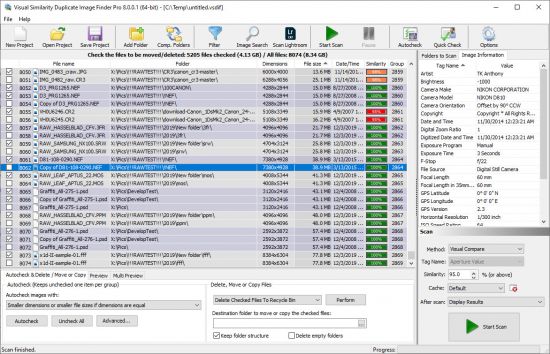
Visual Similarity Duplicate Image Finder Pro
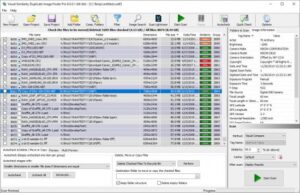
Duplicate Image Finder “looks” at your photos to find similarities. Find look-alike and duplicate images in a folder, computer, network, or find duplicates in Adobe Lightroom. Organize photos by eliminating useless repeating pictures – save valuable disk space. Identify similar and duplicate photos even if they are edited, rotated, flipped, or color-corrected.
Visual Similarity Duplicate Image Finder is the choice of many professional photographers – you will never need another tool in order to organize photos.
The duplicate photo finder shows all the duplicate images in groups and can automatically mark the smaller resolution and/or smaller file size images to be deleted – the lower quality ones.
Supports 40 popular image formats (including Photoshop/Lightroom PSD, TIFF, HEIC/HEIF, JPG, WebP…) and 300+ RAW camera photo formats(CRW, CR2, CR3, NEF, DNG…). Due to its innovative and optimized algorithms, it is the fastest and the most precise duplicate photo finder on the market.
Features
Duplicate Image Finder is a powerful utility for finding similar and duplicate images in a folder and all its subfolders. It is the best duplicate photo finder and provides countless duplicate image removal options
Find similar images or duplicate photos in a folder, drive, computer, or network using visual compare
Find similar images of a sample photo – Reverse Image Search
Find duplicate image files – exact duplicates
Find Lightroom duplicates – scan Adobe Catalogs
Search duplicate images by a time difference in EXIF original date time
Identify rotated at 90°, 180°, 270°, flipped horizontal and/or vertical, and grayscaled duplicate photos
Adjust the percent of image similarity for the photo search
Smaller resolution duplicates can be automatically marked
Smaller file size duplicates can be automatically marked
Older files can be automatically marked for deletion
Show preview of original and duplicate images
Powerful filter and exclude from auto-check options
Multiple Quick Check/Uncheck dialog
Duplicate images can be copied, moved to Recycle Bin, custom folder or deleted permanently
Supports all popular image file formats and RAW camera images (only in Pro and Corporate versions)
Internal CACHE which dramatically improves performance for subsequent scans
System Requirements: Windows 11/10/8.1/8/7 (Both 32 & 64 Bit)
What's new
- Added: Improved user interface and overall usability
- Fixed: Comparing images by EXIF Date and Time could lead to wrong results in some cases
- Fixed: Memory leak while loading .webp images
Images