FourClicks Media
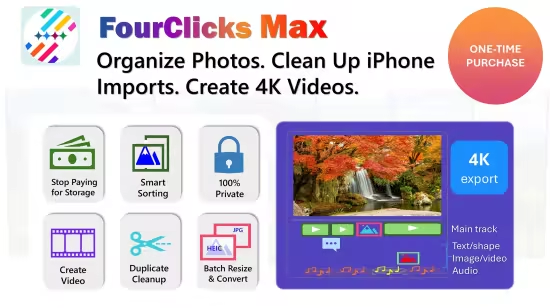
FourClicks Media : In the digital era, our lives are chronicled through a ever-expanding library of photographs and videos. Yet, this abundance often leads to a paradoxical problem: our most cherished memories become lost in a chaotic sea of files, trapped in incompatible formats, buried in confusing folders, and consuming precious storage space. For the individual who values both their memories and their time, managing this digital legacy can feel like a part-time job. Enter FourClicks Max, a revolutionary software solution that redefines personal media management. It stands proudly as The All-in-One Media Suite, a unified platform engineered to organize photos, fix iPhone problems, and create and polish 4K videos. This powerful application seamlessly merges professional-grade batch file management with a full-featured, intuitive 4K video editor. It is meticulously designed for the modern user—anyone drowning in digital photos who wants to secure their memories offline—and it accomplishes this vital mission without monthly subscriptions, offering a one-time solution for lifelong digital clarity.
The journey to order begins with tackling the most common source of digital frustration: the smartphone. Specifically, FourClicks Max excels at the crucial first step of Fix iPhone Messes. When you connect an iPhone, the software intelligently navigates the notoriously convoluted DCIM folder structure. It doesn’t just access these folders; it flattens nested DCIM folders, bringing all your photos and videos to a single, logical location. Simultaneously, it performs essential housekeeping by using advanced algorithms to remove Live Photo duplicates. These paired files (a still image and a short video) silently double your storage usage. With one click, FourClicks Max cleans this up, reclaiming space and delivering a tidy, manageable library ready for the next step.
That next step is universal compatibility, achieved through the robust Batch Convert engine. In a world of proprietary formats, the software acts as a universal translator. Need to share a batch of photos with someone on an older device? Simply change HEIC to JPG in bulk. Have hours of iPhone video in the MOV format that you want to edit or share more easily? Effortlessly convert MOV to MP4 in bulk. This batch processing capability handles thousands of files simultaneously, saving immeasurable time and ensuring your media is always in the right format for any purpose, from social media to professional editing suites.
With files converted and de-duplicated, FourClicks Max introduces its intelligent organizational layer: Smart Sort. This feature moves beyond manual folder creation, using metadata to automatically organize by Year, Location, Resolution, or Orientation. Imagine instantly compiling all panoramic landscape shots from a 2023 trip to the mountains, or isolating all high-resolution portraits from a family reunion. This contextual, multi-dimensional sorting brings a librarian’s precision to your personal archive, making specific moments instantly retrievable rather than perpetually lost.
The organizational prowess reaches its peak with advanced Face Detection and Recognition by AI. This is not a simple tagging tool; it is a continuously learning system that maps the faces of your loved ones across your entire photo history. It can intelligently sort photos to separate people from scenery, creating automatic albums of portraits versus landscapes. More powerfully, you can find a specific face across decades of memories—every picture of a child, a parent, or a friend—gathered in seconds. This transforms your library from a collection of files into a deeply personal, searchable narrative of your life’s relationships.
Underpinning every one of these features is a foundational commitment to privacy and security: 100% Offline operation. In a time of pervasive cloud subscriptions and data mining concerns, FourClicks Max offers a sanctuary. Your data never leaves your PC. The software requires no accounts to create, utilizes no clouds for processing, and engages in no tracking of your activity. All AI face recognition, all batch conversions, all editing—everything happens locally on your machine. This guarantees complete privacy for your most personal memories and provides total control, aligning with the growing demand for software that respects user sovereignty.
Recognizing a key use case, the developers crafted a specialized “Prep & Create” workflow for families and travelers. This guided pathway turns a daunting project—like crafting a vacation video—into a simple, three-step delight. First, it can automatically batch rename and sequence your photos (e.g., “ItalyTrip_001.jpg”), imposing perfect chronological order. Second, with that sequence ready, you can instantly turn that sequence into a cinematic 4K Slideshow. The magic here is that no timeline skills are required—just click and create. The software applies professional transitions, syncs to music, and renders a stunning video narrative in minutes, ready to share or archive.
One of the most innovative solutions FourClicks Max offers is for the eternal struggle with storage space. It allows you to compress massive photo folders into single, high-quality 4K video archives. You can realistically turn 500-1,000 photos into 1 video file, potentially saving gigabytes of space while keeping your memories perfectly viewable in a dynamic, cinematic format. This addresses a critical pain point: the desire to declutter without deleting. And it eliminates the archival anxiety of “What if I need the original?” because you can use the built-in Editor to extract full 4K still images from your video archives anytime. The video becomes a high-quality, space-efficient container from which perfect stills can be retrieved, offering the best of both worlds.
For projects requiring fine control, the integrated Timeline Editing suite provides professional tools. Users can trim, cut, split, and merge clips with frame-level precision, allowing for the creation of polished, intentional videos beyond automated slideshows. The accompanying Creative Suite unlocks further expression, enabling you to add text overlays, shapes, picture-in-picture, and audio tracks to narrate and enhance your story.
Transparency and value are paramount. FourClicks Max promises No Hidden Fees. You can export true UHD 4K video without watermarks or “Pro” unlocks. There are no tiered features or export limitations; the software you purchase is complete, empowering you to create at the highest quality without restriction.
Designed for the modern Windows environment, FourClicks Max requires OS: Windows 10 version 19041.0 or higher. It is accessible, with a Memory requirement of 4 GB (Minimum), though 8 GB (Recommended) ensures smoother performance, especially during 4K video rendering and AI tasks. For optimal speed and responsiveness, a processor like the Intel Core i5-1335U (Minimum) is suitable, with the Intel Core i7-1360P (Recommended) providing the best experience for handling large batches of high-resolution media.
In conclusion, FourClicks Max is more than a bundle of utilities; it is a coherent, privacy-focused ecosystem for digital life management. It begins by cleaning up the mess, organizes with intelligent automation, preserves with innovative archiving, and empowers with creative editing—all within a one-time purchase framework. It is the definitive tool for anyone who seeks to transform digital chaos into curated, accessible, and beautifully preserved memories.