
PC Internals: Your Ultimate Guide to Comprehensive System Analysis and Proactive Drive Monitoring
PC Internals : In today’s digital world, understanding the inner workings of your computer is no longer a luxury reserved for IT experts—it’s a necessity for anyone who values performance, stability, and data security. Whether you’re a gaming enthusiast pushing your hardware to the limit, a creative professional relying on seamless operation, or an IT manager responsible for multiple systems, having deep, real-time insight into your PC’s health is crucial. ASCOMP Software has answered this need with the release of PC Internals, a powerful and intuitive Windows solution designed to provide a comprehensive analysis of your system components while offering reliable, proactive monitoring of your hard drives and SSDs. This software bridges the gap between advanced technical diagnostics and user-friendly accessibility, making it an indispensable tool for private users, tech enthusiasts, IT professionals, and resellers alike.
Unveiling Your PC’s Full Potential: A Deep-Dive Analysis Tool
At its core, PC Internals is built to provide unparalleled transparency. With just a single click, the software conducts a detailed and thorough analysis of your entire system. It goes far beyond basic specs, delivering a rich, organized overview of every critical component:
- Processor (CPU): Discover detailed information about your CPU’s model, architecture, core count, clock speeds, and cache sizes. Live performance graphs visualize utilization across all cores and threads, helping you identify bottlenecks during intensive tasks.
- Memory (RAM): Get precise data on installed RAM modules, including total capacity, type (DDR4, DDR5, etc.), operating frequencies, and timings. Real-time monitoring displays current usage, available memory, and even standby lists, which is vital for diagnosing slowdowns.
- Graphics Card (GPU): For gamers and content creators, PC Internals reveals key details about your GPU, from its model and driver version to dedicated video memory. Monitoring its load, temperature, and clock speeds in real-time is essential for optimizing performance and preventing thermal throttling.
- Drives (HDDs & SSDs): This is where PC Internals truly excels. It lists all connected storage devices, providing interface type (SATA, NVMe), capacity, and partition layout. Crucially, it serves as your early warning system against data loss.
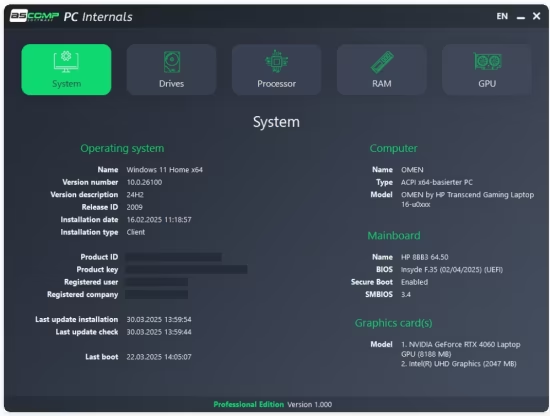
- System Overview: The software aggregates other vital data, including motherboard model, BIOS/UEFI version, operating system details, and network adapter information, giving you a complete picture of your machine’s ecosystem.
Proactive Data Protection: Advanced SMART and Drive Health Monitoring
The most standout feature of PC Internals is its sophisticated drive monitoring capability, a function that moves it from a simple diagnostic tool into the realm of essential preventative maintenance. Data loss from sudden drive failure can be catastrophic. PC Internals mitigates this risk by directly interfacing with the SMART (Self-Monitoring, Analysis, and Reporting Technology) attributes built into every modern HDD and SSD.
The software doesn’t just present raw, cryptic SMART data; it interprets it for you. It provides clear, actionable insights into:
- Drive Lifespan and Health: For SSDs, it can report on metrics like Total Bytes Written (TBW) and percentage of lifetime used, allowing you to plan for upgrades before failure.
- Early Failure Detection: It monitors critical attributes like Reallocated Sectors Count, Command Timeout, and Unc Correctable Errors—key indicators of a deteriorating drive.
- Temperature Monitoring: Continuous tracking of drive temperature is vital, as excessive heat is a primary cause of hardware degradation. PC Internals displays this in real-time within its clean interface.
The Professional Edge: Automated Alerts for Peace of Mind
While the standard version offers robust monitoring, the Professional Edition of PC Internals introduces a powerful layer of automation and peace of mind. This edition transforms the software from a tool you occasionally check into an active guardian of your system. Users can define custom thresholds for virtually any parameter—be it a maximum temperature for your CPU, a minimum amount of free RAM, or a critical remaining lifespan percentage for your SSD.
When these user-defined limits are breached, PC Internals springs into action. It can deliver instant alerts directly via Windows desktop notifications, ensuring you’re immediately aware of an issue, even if you’re working in another application. For professionals managing systems remotely or who need a persistent record, the software can also send automated email notifications. This feature is invaluable for IT administrators who need to monitor servers or office workstations, or for any user who wants to be warned of a potential drive failure while away from their computer.
The Ideal Tool for a Wide Range of Users
PC Internals’ strength lies in its versatility. Its intuitive presentation of complex data makes it perfect for the everyday user who simply wants to check their system specs or understand why their PC is running slowly. For the tech enthusiast or gamer, the live performance graphs and temperature readouts are perfect for tuning systems, validating overclocks, and ensuring stable performance under load. IT professionals and resellers will find the comprehensive reports and proactive alerting system indispensable for maintaining fleets of computers, performing pre-purchase diagnostics on used hardware, or providing value-added services to clients.
Conclusion: Take Control of Your Hardware’s Health
In a landscape cluttered with fragmented utilities, PC Internals stands out as a unified, powerful, and reliable all-in-one solution for system analysis and monitoring. It empowers you to move from reactive troubleshooting to proactive system management. By offering a crystal-clear window into your PC’s components and implementing vigilant, intelligent monitoring of your most valuable asset—your data—PC Internals provides the tools you need to optimize performance, extend hardware lifespan, and, most importantly, safeguard your digital life. It’s more than just a diagnostic utility; it’s an essential component of a modern, responsible computing setup. Discover the confidence that comes with complete hardware transparency and take the first step towards smarter PC ownership with PC Internals.